
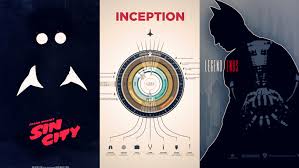
WHAT IS IT?
Some posters for movies and TV Shows are done really badly. Your task is to take an existing poster for a TV Show or Movie, and redesign it.
RESOURCES
HOW TO REDESIGN
STEP 01: PICK YOUR POSTER
Choose a poster that you feel strongly about redesign. Create a new poster for this movie/ TV SHOW. You must pick a poster and show Mr. Remedios prior to starting. It must be approved by Mr. Remedios in order for your redesign to begin.
STEP 02: GET IT APPROVED
- Create a google drive folder name it LAST NAME-FIRST NAME- POSTER
- Submit your link to your google drive.
- Copy and paste your poster that you WANT TO redesign from whatever TV SHOW or Movie into the folder and name it 001. ORIGINAL POSTER
STEP 03: MAKE YOUR POSTER
Time to make your poster – Be sure to read the Must haves and have nots.
PARAMETERS/ LIMITATIONS:
- 11″ x 17″ – portrait (vertical)
- 300 dpi (resolution for printing)
- CMYK colour mode (colour mode for printing)
- The poster must not be offensive !!!
- If you have any doubts about the suitability of your poster, ask Mr. Remedios to review it.
- Be sure to create the elements in Photoshop and Illustrator then make your poster in inDesign
DON’TS & DO’S
- This is a creative design project – do not simply throw some images together and apply some photoshop effects
- The poster must be creative and effective – make it your own, be original
- The poster must appear authentic (if it’s a movie poster it should look like a movie poster)
- Your poster must follow the essential tips on poster design
- The user comes first
- Reduce clutter
- Use text sparingly
- Think big
- Rule of thirds
- Elements & Principles of Design
- Notice the student made poster vs the actual poster. The student made one is very simple, and it’s missing crucial information like the date.
- Ask yourself what you need to include in your poster before submitting.
- Is the background interesting or plain.

SUBMISSION
- Google Drive link with the following three things in there.
- 001 – ORIGINAL MOVIE/ TV SHOW POSTER
- 002 – YOUR POSTER IN PSD (photoshop format)
- 003 – PNG of your final poster !
 Remtech Studio